

Why construction field reporting apps fail with crews.
A Crew Capture Guide.
Field reporting fails when it asks crews to create reports for the office. Crew capture works when it makes the crew's life easier — and becomes a natural part of how work actually happens.
Email me the checklist
We’ll email you the printable version and give you immediate access here.
It’s on its way—check your inbox.
Download now- Daily reportRebuilt from memoryAssembled from the record
- Hazard foundBuried in textsCaptured + routed
- Site photosStuck on phonesTagged to task & time
- Field questionAsked again laterAnswered at the point of work
- Corrective actionLost in a spreadsheetOwned and closed
 Rosie assembles it
Construction daily reports matter. But the way daily reporting is usually done creates an adoption problem: too many workflows are designed around the report the office wants, not the moment the crew is actually in.
Crew capture solves the problem: it captures operational facts as work happens — and it doesn't feel like reporting at all. Crew capture helps the crew find the procedure, answer the question, capture the hazard, prove the condition, close the action, and move on.
The best daily log is not written from memory. It is assembled from the operational truth captured throughout the day.
Crew capture is field data that helps the crew first.
Crew capture is the practice of collecting jobsite facts from the people closest to the work, while work is happening — in a way that helps the crew, not just the office. It includes safety forms, daily-log inputs, photos, voice notes, hazards, near misses, permits, inspections, field questions, corrective actions, and proof of work — tied to the crew, task, location, risk, and time.
Crew capture is not just faster reporting. It's the field data engine behind operational safety, daily reporting, claims protection, and business intelligence.
The problem isn't daily reporting. It's the lack of value exchange.
Field reporting apps fail with crews when they create work without giving value back. Common causes: report-first design, end-of-day reconstruction, too much typing, duplicate entry, poor mobile usability, disconnected safety workflows, weak follow-up, and a failure to capture the field events that protect the business later.
A daily report should be the output of field capture — not the reason the field has to stop and do admin. The moment you start with the office's record instead of the crew's task, you've built the adoption problem in.
They start with the report, not the crew
The software asks how to get the daily report done. The crew asks how to start work, stay safe, solve the issue, prove what happened, and keep moving. That gap is the adoption problem.
They ask one person to reconstruct the day
The report depends on a foreman rebuilding the day from memory. That's fragile — the best facts are freshest when the work is happening.
They make crews type when crews are moving
Typing-heavy workflows break down in the field. Capture has to fit the jobsite: quick taps, QR, voice, photo, offline, templates, translation, and minimal required fields.
They separate safety from the reality of the job
A missing guardrail is a hazard, a work interruption, a possible delay, a corrective action, a photo, a daily-log entry, and maybe evidence in a dispute. Crew capture keeps that one event connected.
They give the office value but the crew little back
A workflow gets adopted when it helps the crew: find the procedure, get an answer, capture proof, show a hazard was resolved, avoid blame, move work forward. Feed-only systems lose adoption.
They don't close the loop
A hazard report that disappears is worse than none — it teaches the crew that reporting doesn't matter. Capture must become ownership, action, closeout, and feedback.
They don't protect the business well enough
A thin report may satisfy a process but won't protect the contractor when facts are challenged. Claims turn on contemporaneous records: what happened, who was there, what changed, what delay occurred, what evidence exists.
They treat adoption as training, not workflow design
Training matters, but it can't save a workflow that doesn't fit the job. If a reporting workflow doesn't make the crew's life easier, more training won't save it.
If a reporting workflow doesn't make the crew's life easier, more training won't save it.
Why operational safety is the best conduit for field intelligence.
Most field reporting starts with the office's need for a record. Operational safety starts somewhere better — with the crew's need to get work started, control risk, answer questions, document what changed, and move on. It's already present before, during, and after the work. Operational safety already asks the questions that create the best field intelligence.
Operational safety isn't another reporting layer. It's one of the few structured workflows already attached to the moment of work — which makes it the most natural path to broader crew capture.
Operational safety-led crew capture:
- Starts with the crew's task
- Captures in the moment
- Depends on live field context
- Distributed across the people closest to the work
- Produces daily-log inputs, safety records, actions, proof, and risk signals
- Helps the field get answers, prove conditions, and close issues
- Turns field activity into intelligence
“What happened today?”
“What did it look like?”
“What does the plan say?”
“What was the crew doing, what risk existed, what changed, what was captured, what action followed — and what does that mean now?”
No other documented workflow is as naturally positioned at the intersection of worker, crew, task, risk, location, procedure, event, action, and time.
The Crew Capture Test — and how SALUS passes it.
Don't ask only whether an app can create a daily report. Ask whether it captures the operational truth of the day in a way that helps the crew, strengthens the record, and protects the business. Tap any test to see how SALUS answers it.
The crew-value test
The crew gets value first — answers, not just another form.
- Ask Rosie a question and get a sourced answer at the point of work.
- Find the right procedure, SDS, or permit without leaving the task.
- Capture proof in seconds and keep moving — no end-of-day catch-up.

At 40 ft of reach, the rated capacity is 2,500 lb with the load centered and the boom at or below 45°. Confirm the load weight before lifting.
- Rated capacity
- 2,500 lb
- Configuration
- 40 ft reach · centered load · boom ≤ 45°
- At 50 ft
- Capacity drops to 1,200 lb
The operator still verifies the actual load, attachment, and machine configuration before the lift.
The moment test
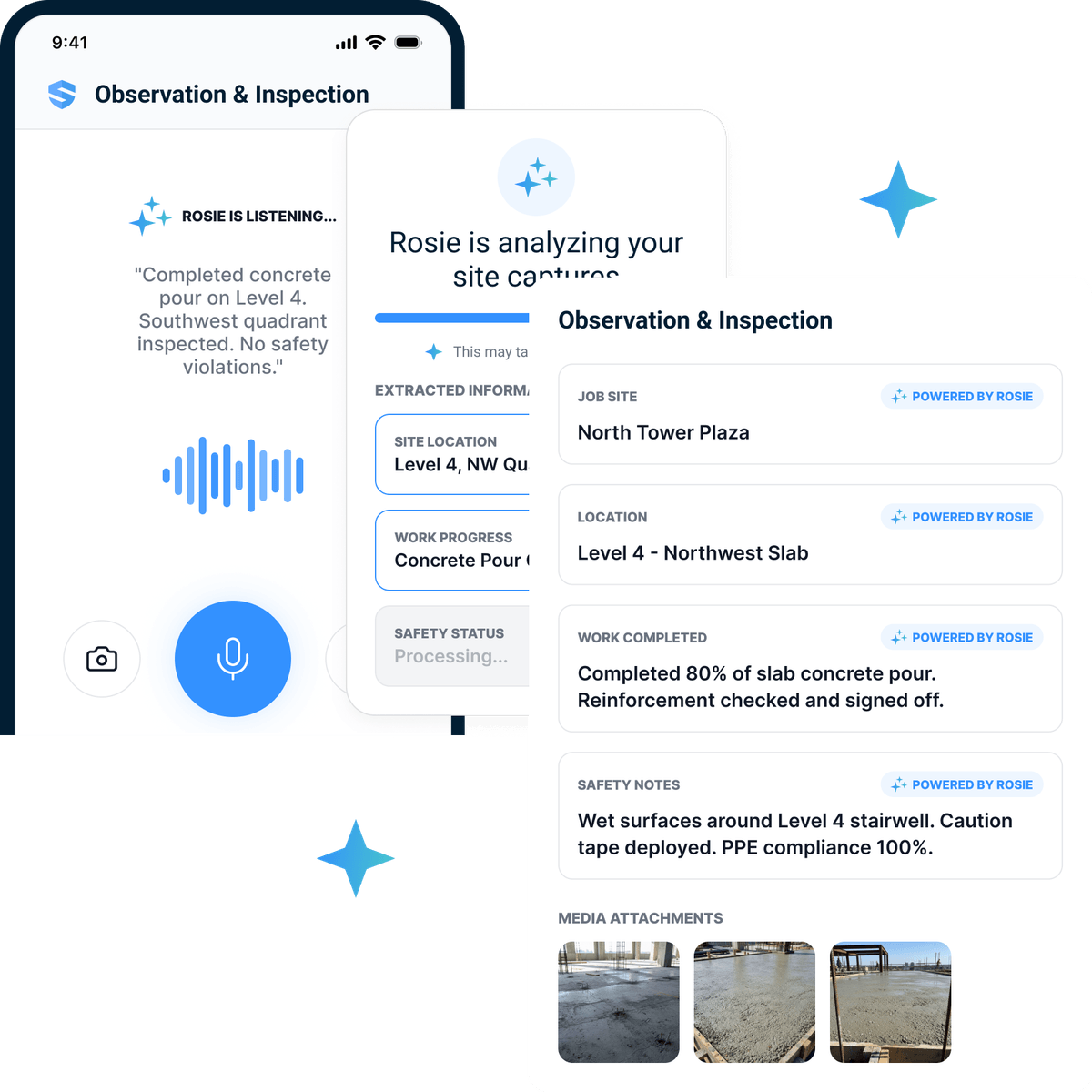
Captured in the moment — spoken, snapped, or tapped.
- A voice note becomes a structured field record, hands-free.
- Photo and context are tied to crew, task, location, and time.
- Nothing waits to be reconstructed from memory at the trailer.
The operational-safety test
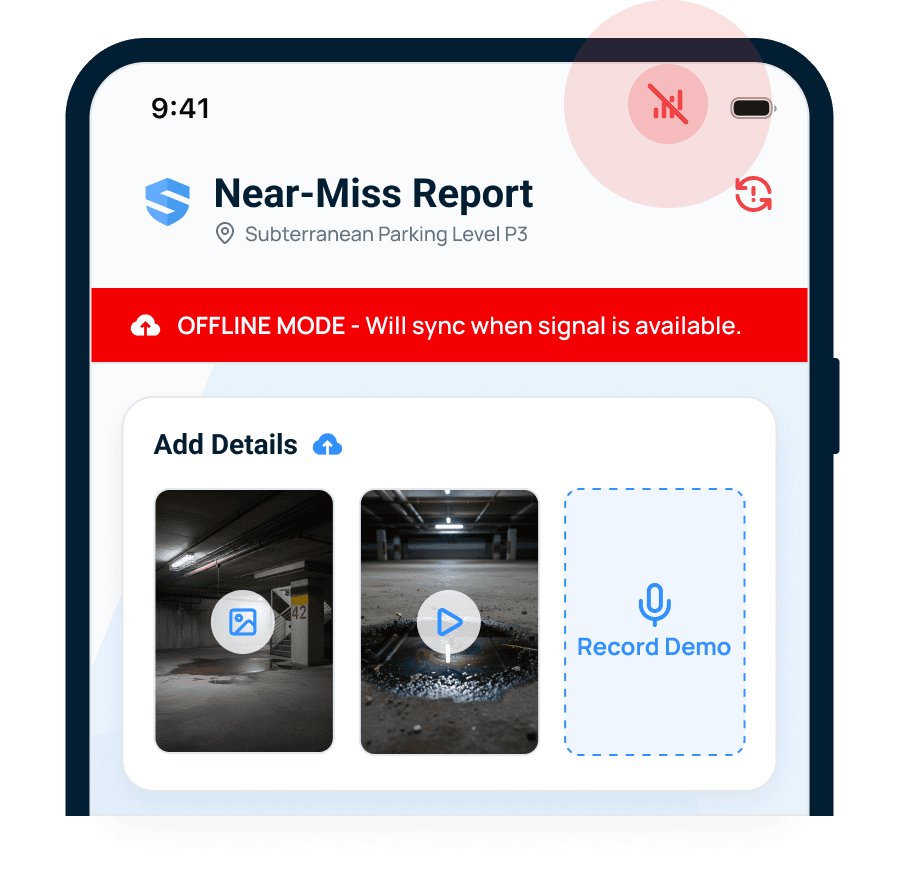
The crew's safety step is the capture — not a second chore.
- Pre-task plans, hazards, permits, and inspections are the capture path.
- The same low-friction flow captures the other field facts that matter.
- Readiness is visible before the crew starts work.
The closed-loop test
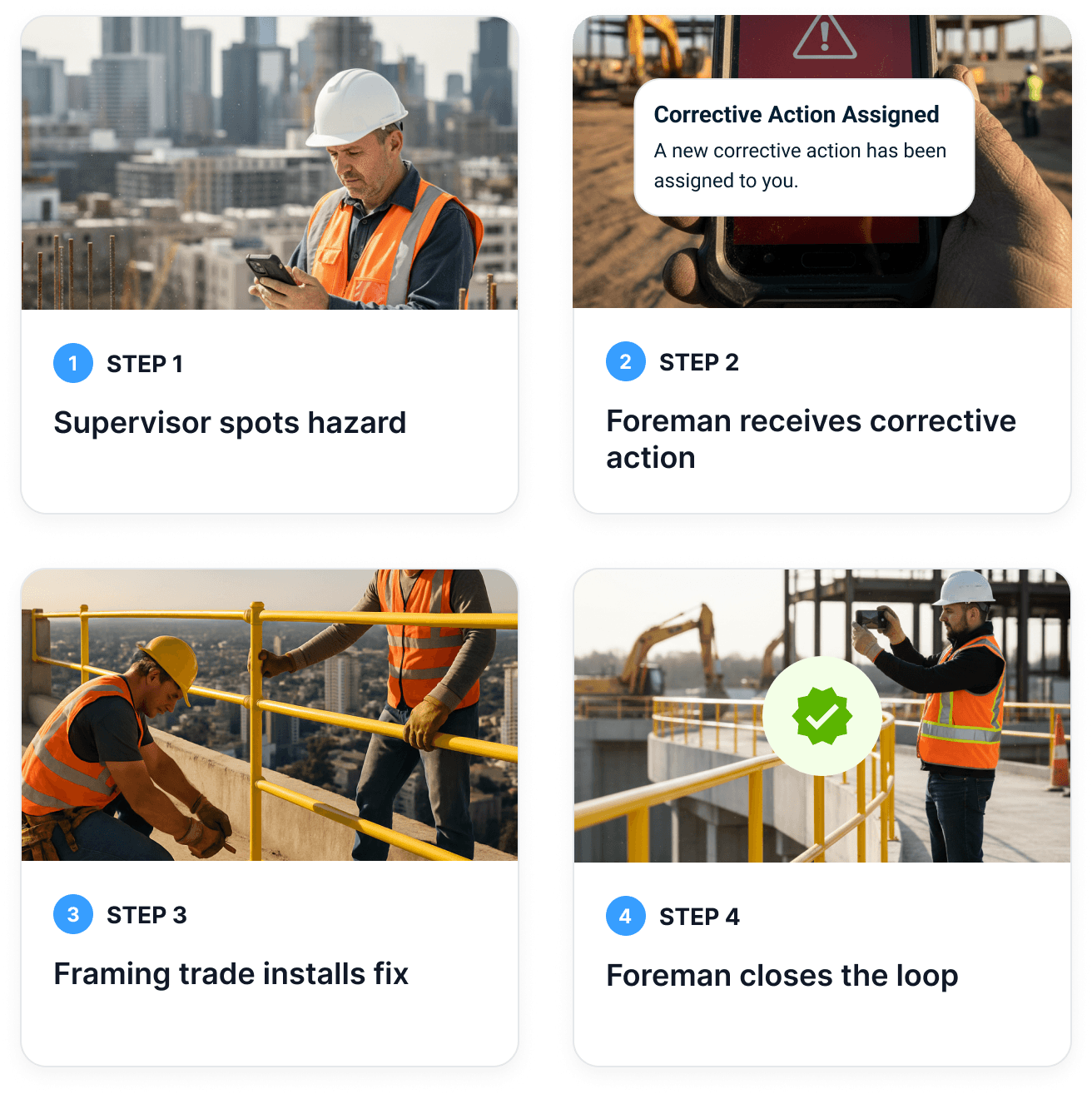
Captured → routed → owned → closed, with proof.
- A hazard is assigned the moment it's captured.
- The field can see it didn't vanish into a spreadsheet.
- Closeout is confirmed with photo proof.
The daily-log test
The log assembles itself from the day's captures.
- Forms, photos, notes, and actions roll into the daily report.
- The foreman reviews instead of rebuilds.
- End-of-day reconstruction disappears.
The daily record is assembled. Two crews are missing hazard assessments, one near miss is documented, and one corrective action remains open from last week.
- Site activity
- 23 workers · 12 form submissions
- Safety record
- 0 incidents · 1 near miss
- Follow-through
- 3 new actions · 1 carried open
The foreman reviews the assembled report before it becomes the final daily record.
The claims-readiness test
A claim-ready record, captured before the story blurs.
- Who was there, what changed, what conditions existed, what action followed.
- Timeline, photos, and context tied together — not scattered across phones.
- Ready when an owner, insurer, or dispute comes asking.
The due-diligence record is assembled. Daily hazard assessments cover 96% of active site-days, incident response averages 2.3 hours, and 23 fall-protection certificates need attention.
- Field evidence
- 12,847 forms · 96% active site-days covered
- Follow-through
- 94% of corrective actions closed
- Credential gap
- 23 fall-protection certificates expire within 30 days
The risk team reviews the source-linked packet before it is shared with the broker or insurer.
The intelligence test
Field activity becomes patterns leaders can act on.
- Repeat hazards and recurring blockers surface by crew, trade, and site.
- Open actions and delayed closeouts are visible early.
- Risk shows up before it becomes an incident.
Three projects need attention. Northgate Tower is the most exposed because of 436 unassigned corrective actions, one serious open incident, and a slipping schedule.
- Northgate Tower
- High safety · behind schedule · margin at risk
- SeaTac Terminal
- Medium safety · tight schedule · margin eroding
- Broadway Towers
- Medium safety · on track · healthy margin
This is a decision-support ranking; leaders review the linked evidence before acting.
That's the heart of the test. Score the full set of dimensions in the Crew Capture Checklist below.
What crew capture looks like during a real workday.
Capture isn't a separate task bolted onto the end of the shift. It's distributed across the moments the crew is already in — and the daily log falls out of it.
- 0106:30Morning start
The crew starts ready — and capture starts with them.
Pre-task plan, FLRA/JHA, toolbox talk, permits, and worker readiness happen on mobile. The right procedure is one tap away — and each of those steps is a captured field fact, not an office chore.
RosieMobilization readinessThe first site mobilizes Monday with a new bilingual crew. Get them ready.Drafted the site-specific safety planPlan draftedBuilt the orientation and field formsPackage builtPrepared the crew-language documentsEN + ES readyThe site is ready to mobilize Monday with the plan, orientation, field forms, and hazard controls prepared for the crew.
Monday mobilization — readiness record- Site controls
- Site-specific plan + deployed hazard controls
- Crew package
- Orientation + required field forms
- Languages
- English + Spanish
Sources: Site profile · company standards · crew rosterThe site lead confirms the final scope, crew, and local requirements before mobilization.
- 0210:40During the work
A hazard, a question, a photo — captured in seconds.
A changed condition, a blocked task, a subcontractor input, or a quick question gets captured with a tap, a photo, or a voice note — tied to the site, crew, task, and time. No retyping, no chase.
- 0314:15When something changes
A near miss becomes an owned, tracked action.
A near miss, a delay, an inspection finding, or an owner directive is captured where it happens. The right stakeholder is notified, a corrective action is assigned, and the loop closes with proof.
- 0417:30End of day
The daily log assembles itself.
Instead of reconstructing the day from memory, the daily log is assembled from everything the crew already captured — forms, photos, notes, hazards, and actions — with the foreman reviewing, not rebuilding.
RosieDaily site summarySummarize what happened at Broadway Towers yesterday from the forms, photos, and notes.Pulled yesterday’s field submissions12 formsReviewed the attached site evidence8 photosParsed the supervisor record3 notesThe daily record is assembled. Two crews are missing hazard assessments, one near miss is documented, and one corrective action remains open from last week.
Broadway Towers — daily summary- Site activity
- 23 workers · 12 form submissions
- Safety record
- 0 incidents · 1 near miss
- Follow-through
- 3 new actions · 1 carried open
Sources: 12 forms · 8 photos · 3 supervisor notesReview daily reportThe foreman reviews the assembled report before it becomes the final daily record.
Capture once. Strengthen everything.
The same moment, captured well, makes safety stronger and the daily log a byproduct instead of a chore.
Stronger safety
- Better pre-task planning and readiness
- Faster hazard and near-miss capture
- Corrective-action closure that sticks
- Procedure, training, and certificate context in hand
- Risk patterns surfaced before incidents
Stronger daily logs
- Daily-log fields populated from captured events
- Less end-of-day reconstruction from memory
- Photos and notes already tied to task, time, and location
- Subcontractor activity and conditions recorded as they happen
- A report the foreman reviews instead of rebuilds
How crew capture protects the business.
Operational safety is the entry point, but the value doesn't stop there. The same field event can matter to safety, schedule, quality, cost, insurance, payment, and claims. Crew capture keeps that story intact instead of scattering it across phones, texts, and separate systems.
Claims are rarely won by a generic daily report. They're strengthened by specific, timely, contextual field facts — captured before the story gets blurry.
This guide doesn't give legal advice. But it can say with confidence: better contemporaneous field records make it easier to understand, explain, support, and resolve questions about what happened.
AI can dramatically reduce friction and make capture more useful.
The same captured moments power both sides of the business. In the field, Rosie removes typing and answers questions. In the office, Rosie turns those captured facts into the reports people need — in minutes, not hours.
- Voice note → structured field note
- A field question → a sourced answer at the point of work
- Photo + a few taps → a documented hazard or observation
- The right procedure, SDS, or permit surfaced on the phone
- Offline capture that syncs when signal returns
- Translation so the crew works in their own language
The reports Rosie builds from captured facts — and how fast.
Why SALUS + Rosie is built for crew capture.
Daily-report-first tools help complete the report. Photo tools capture visual proof. Project systems organize records. All useful — but none of them start from the deepest field workflow already attached to the work: operational safety.
Operational safety already asks the questions that create the best field intelligence. What task is the crew doing? What risk is present? What procedure applies? What permit is required? What changed? What question came up? What action was assigned? What proof confirms closeout?
SALUS starts from those workflows — forms, JHAs, FLRAs, toolbox talks, inspections, hazards, near misses, incidents, orientations, certificates, corrective actions, and reporting. These aren't side records. They're field moments.
Daily-report apps help teams complete the report. SALUS + Rosie helps crews capture the operational truth the report should be built from.
Rosie makes that capture layer useful: faster answers for the field, cleaner daily logs for the office, closed-loop follow-up for safety, and stronger field intelligence for the business.
Pilot crew capture before you roll it out.
- 01Step 1 of 3
Start with one workflow, one project, one crew champion
Pick a high-frequency moment crews already touch — pre-task plans, hazards, or daily logs — on a single project, with a foreman who'll champion it.
Small, real, and close to the work - 02Step 2 of 3
Measure whether it actually helps
Track time saved, completion quality, missing facts, follow-up speed, and whether the daily log got easier — not just login counts.
- 03Step 3 of 3
Expand once the crew feels the value
Adoption spreads when crews see capture help them first. Roll the same low-friction path out to more workflows and projects.
The Crew Capture Checklist.
Can your field reporting workflow help crews, strengthen daily logs, and protect the business? Score each dimension 0–2 and watch where you land — from report-first to operational-safety ready.
Some capture is digital, but context, crew value, or follow-up may be weak.
0 = not really · 1 = partly · 2 = yes. Score your current field workflow and see where it lands.
Email me the checklist
We’ll email you the printable version and give you immediate access here.
It’s on its way—check your inbox.
Download nowRun the Crew Capture Checklist with your team.
Get the full checklist as a printable worksheet, plus the diagnostic prompts behind every dimension — a practical way to pressure-test any field reporting workflow before you commit.
Email me the checklist
We’ll email you the printable version and give you immediate access here.
It’s on its way—check your inbox.
Download now- 13 dimensions, scored 0–2, with prompts
- Four tiers from report-first to operational-safety ready
- The crew-value and business-protection questions buyers skip
- See how SALUS + Rosie closes each gap
Crew capture metrics worth tracking.
Don't measure adoption by logins. Measure whether capture helped the crew, populated the record, closed the loop, and made the day easier to prove.
Field actions where capture helped the crew act, not just report
Share of facts captured the day they happened
Foreman minutes saved vs end-of-day reconstruction
Daily-log fields filled from captured facts
Time from capture to assigned action
Closure rate and average days to close
Required facts missing at end of day
Systems where the same fact is retyped
Events captured with who, what, when, proof, and follow-up
Recurring hazards and blockers by crew, trade, task, or site
Common questions.
What is crew capture?
How is crew capture different from daily reporting?
Why is safety a natural conduit for field capture?
How does crew capture help protect against claims?
Does crew capture replace daily logs?
How does AI help crew capture?
What makes crew capture different from photo documentation?
Sources and context
Each source is listed for the specific context it supports; none independently validates SALUS product claims.
- Safety Management — Worker Participation
U.S. Occupational Safety and Health Administration
Primary guidance for accessible hazard and near-miss reporting, prompt follow-up, worker input, and removal of language or process barriers.
- Recommended Practices for Safety and Health Programs in Construction
U.S. Occupational Safety and Health Administration
Primary regulatory-program context for worker participation, hazard identification, prevention, training, and program improvement.
Stop asking crews to do more admin. Capture the truth in the moment.
The future isn't field reporting software that asks crews to recreate the day. It's crew capture that makes the work easier, captures the truth as it happens, and turns operational safety into the field intelligence layer for the whole business.
Helps the crew first · Strengthens the daily log · Protects the business