Skip to content
Rosie for Operations Leaders

Keep crews moving. Record crew-level truth.

Rosie helps crews easily capture what matters when it happens, answers workers quickly, monitors risk 24x7x365, and preserves the evidence that protects schedule, productivity and margin.

Now showing · Build the record

See how the project record becomes a reviewable delay claim without reconstructing the work from memory.

I love Rosie. It is just a total game changer. I am working on something right now—I will be done in the next half an hour with Rosie. That would have taken me three days probably.

Amy MooreSafety Manager, Chinook
Public Rosie access opens August 11, 2026

Monitor the reality of the project—not a reconstruction.

The Daily Log writes itself as crews use Rosie to capture safety, quality, delays, extra work, labor, equipment, conditions, and photos in the one SALUS app. At day’s end, the foreman reviews the contemporaneous record instead of reconstructing the shift from memory—and the source evidence is already attached.

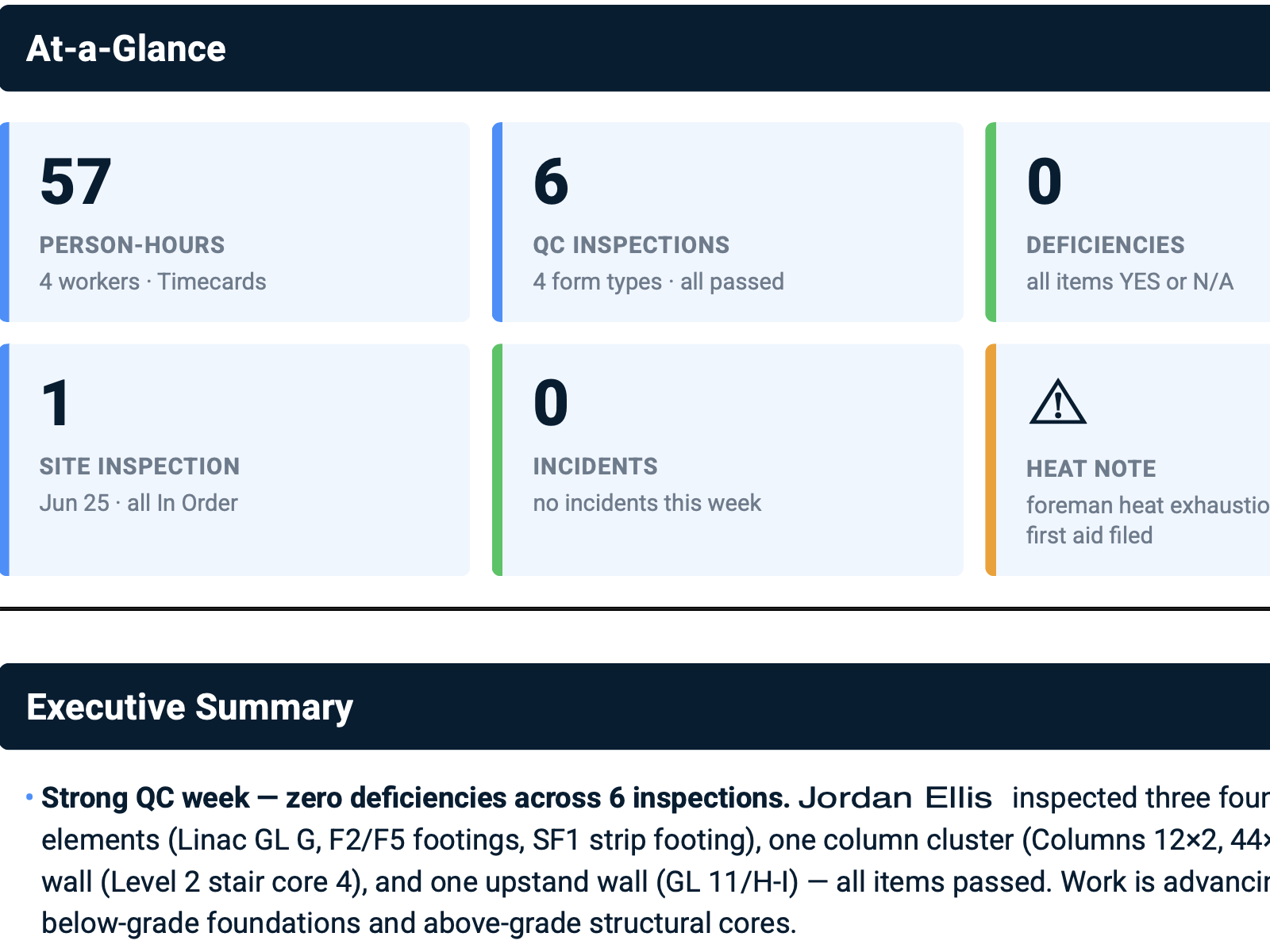
The Weekly Site Report turns that same adopted crew record into a 360-degree view of project health: what moved, what stalled, who and what were affected, which issues remain open, and where the record is incomplete. Rosie surfaces the field reality and the context behind it while Operations can still act.

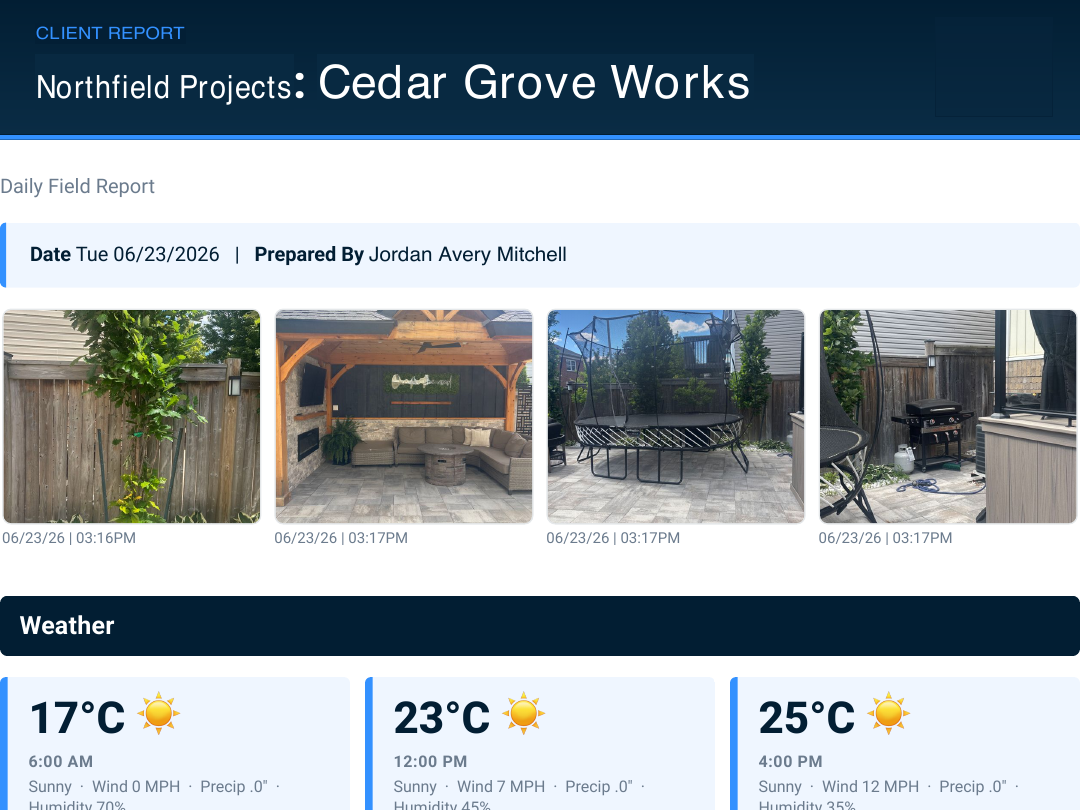
Daily Field Report - LIVE ROSIE REPORT

01 / 02
Daily Field Report excerpt showing the project, reporting date, submitted field photos, weather, work logs, and worker hours

What it answers

What did the crew do today, who was there, what conditions were recorded, and who signed the record?

Preserve work logs, labour, equipment, conditions, photos, and sign-off in one contemporaneous day-level project record.
Showing report 1 of 2: Daily Field Report

Want to see Rosie in action now? Request a demo
  1. 8+

    Years of crew-first product design

  2. 1B

    Field data points

  3. ≈700K

    New data points each month

  4. Human review

    Every draft and recommendation stays under authorized control

How Rosie changes the game

Four ways Rosie changes the game.

Capture the field truth. Add project context. Understand why. Defend the business.

Crew-level data is the clearest proof of what actually happened: who was there, what changed, when it changed, and which voice note, photo, form, signature, or notice supports the account. SALUS connects that raw field proof with structured Procore project context. Rosie reads both to explain what happened, why it happened, and what Operations should review next.

  1. 01
    Prepare

    Start the project with fewer avoidable blockers.

    Rosie can compare the job, scope, company standards and GC requirements, then draft the missing project-specific material for the right people to review.

    The approved output returns to the job instead of living in a detached chat.

  2. 02
    Capture and answer

    Give the field a source-backed answer before work stalls.

    A crew question can be matched to the relevant equipment manual, project rule or approved procedure. Rosie shows the source and limits; the operator or supervisor still verifies the actual task and configuration.

    Specific source, applicable limits and human verification stay visible.

  3. 03
    Understand and prove

    Build the chronology while the evidence is still connected.

    Daily reports, photos, notices, acknowledgements and redirected work already carry the dates and project context needed to review a delay or backcharge position.

    Rosie assembles documented facts; the project team and counsel determine the position.

  4. 04
    Improve

    Turn the project record into the next operational action.

    Project-health signals can route back to the crew, project team or accountable leader, so the report is the start of follow-through—not the end of the workflow.

    Capture once, use across reporting, action and proof.

Ask naturally. Get the report in seconds.

Ask what happened. Get the answer, the why, and the proof.

Rosie mines crew-level evidence enriched with project data to monitor risk and to prepare professional-grade delay claims, daily logs, risk views, and weekly project reports in seconds. No chasing email, texts, photo libraries, or evidence scattered across multiple phones.

Request a demo

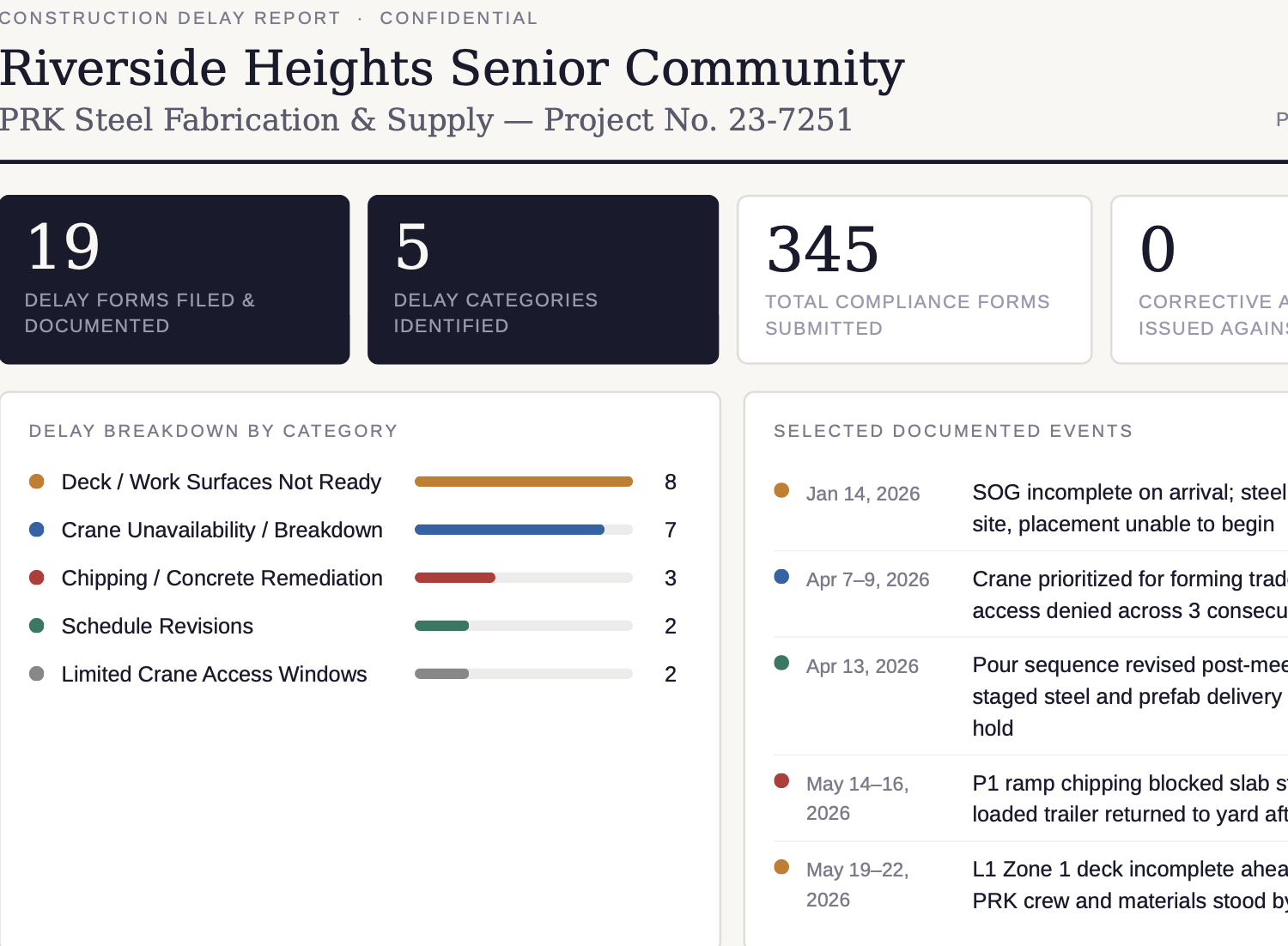
Construction Delay Report - LIVE ROSIE REPORT

01 / 04
Construction Delay Report excerpt showing nineteen documented delay forms, five delay categories, 345 compliance forms, and dated project events

What it answers

What contemporaneous evidence shows why the work was delayed and whether the crew was ready?

Condense delay forms, photos, signatures, labour records, notices, and project context into a chronology and evidence index for project, commercial, and legal review.

Showing report 1 of 4: Construction Delay Report

Why Rosie can answer better

Rosie works because she lives in the workflow - from beginning to end.

The field does not have to recreate the story later. The story is already there: QR scans, forms, timestamps, photos, signatures, certificates, training records, worker profiles, equipment checks, permits, incidents, SDS searches, corrective actions, bulletins, and daily reports.

Generic AI starts with a blank prompt. Rosie starts with the field, the context, and the record.

Input layer

Capture what happened

Rosie helps crews speak, snap, scan, translate, complete forms, submit photos, record signatures, and capture events while the work is happening.

Context layer

Ingest the operating record

Rosie reads context from SALUS, Procore, standards, SDS, procedures, worker profiles, certs, training, equipment, permits, jobsites, crews, and source documents.

Output layer

Create the work product

Rosie generates completed forms, SWPs, toolbox talks, SDS answers, corrective actions, proof packets, owner reports, insurance summaries, Trust Portal content, and risk rankings.

Built for the way crews actually work

Adoption by the crew is the resolution of your field intelligence.

The one SALUS app lets crews speak, snap, scan, sign, or type across safety, quality, delays, access, damage, T&M, and extra work while the event is happening. Rosie makes capture easier. Every adopted capture raises the resolution of the contemporaneous field record—and the quality of every project answer that follows.

  1. 01One crew app
  2. 02Higher field adoption
  3. 03Higher-resolution field truth
  4. 04Project context connected
  5. 05Stronger answers and proof
Crew-level data, multiplied

The crew captures one event. SALUS puts it to work everywhere.

A 30-second field capture should not disappear into a text thread—or force the crew to repeat the same facts in six different systems.

Crew voice note · captured once
Demo scenario

“Blocked access at Grid C-12. Four electricians idle since 9:14. GC superintendent notified. Photo attached.”

WorkerCrewTaskSiteTimePhotoNotice

Rosie structures the event. SALUS keeps the source.

Same connected record · four immediate uses

Rosie structures the event once. SALUS routes it wherever the business needs it.

Output 01

Daily record

Project history updated

Output 02

Team action

PM and responsible lead notified

Output 03

Readiness

Crew, task, and credentials preserved

Output 04

Defence

Contemporaneous source trail started

The field did not complete four reports. It captured one event well.

  • Safety & readiness
  • Extra work
  • T&M
  • Damage
  • Delay
  • Access constraints
  • Backcharges
  • Quality events
Integrations & enterprise readiness

Keep Procore as the project system. Add the crew-level truth.

Procore organizes the project record. SALUS adds the contemporaneous crew-level evidence that explains why the work unfolded as it did—safety, quality, delays, access, damage, T&M, and extra work—and connects the relevant record through supported integrations and API access. The crew captures once; the business gets structured context without double entry.

The Procore integration created more tangible value in the form of time back to the field. We eliminated double entries.

Justin Itulle · Field Integration Manager, Willmeng Construction

Procore deep sync

Route submitted SALUS forms to configured Documents folders, forms requiring review to Tasks, attachments to Photos, and mapped manpower to pending Daily Log entries—without asking the crew to enter the same event twice.

Project-system connections

Use API access to connect crew-level SALUS records to other project, enterprise, BI, and reporting workflows.

Automations

Send certificate alerts, overdue-action escalations, report digests, and stakeholder updates automatically.

Scheduled reporting

Deliver weekly, monthly, owner, insurance, or executive reports without manual assembly.

Procore · Project systems · API · Automations · Scheduled reports

Proven in the field

The difference shows up in the work.

The customer evidence stays attributed to each person’s actual role. Together it shows that easy crew capture, connected project context, and source-linked answers return time to leadership and give Operations a stronger record to act on.

B&B Group of Companies logoRosie proof

I have used other AI tools but they were not connected to my company’s SMS documentation. By having all of my historical SMS data reviewable, it uses my real-world data to give me insight into what actions will have the greatest positive impact.

Scott CoristineHealth & Safety Manager · B&B Group of Companies
LMS Reinforcing Steel Group logoRosie proof

Me and my team have the bandwidth to actually focus on safety now that we're not constantly being bogged down in paperwork.

Ben SleemanDirector of Safety · LMS Reinforcing Steel Group · 170+ sites, 600 employees
Smith Bros & Wilson logoRosie proof

The biggest differentiator is being able to ask a plain-language question and get a useful answer directly from our own data.

Krista ChisholmHealth & Safety Manager · Smith Bros & Wilson
FAQ

Questions Operations leaders ask before putting Rosie to work.

Is Rosie only for the safety department?
No. The same low-friction field workflow can capture and interpret safety, delay, damage, time, extra work and other project events. Operations teams can use the connected record for readiness, project health, schedule defence and margin protection.
Does Rosie make decisions or approve safety and commercial work?
No. Rosie gathers source material, drafts answers and assembles reviewable outputs. Accountable safety, project, commercial or legal professionals verify the facts, apply judgment and approve anything that goes to a crew or outside party.
What makes Rosie different from a general AI assistant?
Rosie works inside the connected SALUS record. Field input is tied to the relevant worker, crew, project, task, equipment, credential and time, so an answer can point back to its sources and return to the operational workflow.
Can SALUS connect with Procore?
Yes. SALUS offers a deep Procore integration so project context and safety workflows can stay connected without making crews repeat the same administrative work.
How are US and Canadian project and commercial terms handled?
Rosie uses the project, contract, and market context available to the workflow.🍁Canadian contract, notice, lien, workers’ compensation, insurance, and OHS requirements vary by province or territory, so qualified project, commercial, legal, insurance, and safety reviewers remain accountable.
Your next operations workflow

Capture the field truth. Keep the project record ready.

Bring a project question, delay, extra-work event, quality issue, or claim. See how Rosie turns crew-level proof plus connected project context into a sourced answer your team can review.

Return to the motion