Skip to content
Searchable SDS

Searchable SDS answers in seconds.

With Rosie, Contractors’ Admin and Risk AI, workers can ask a chemical question in plain language or by voice and get the concise, verified first-aid, PPE, handling, or exposure answer in 8 seconds without digging through a 16-page PDF.

Type it or speak it β€” plain language, any language. Every answer is sourced from the verified SDS on file, not from a search engine.

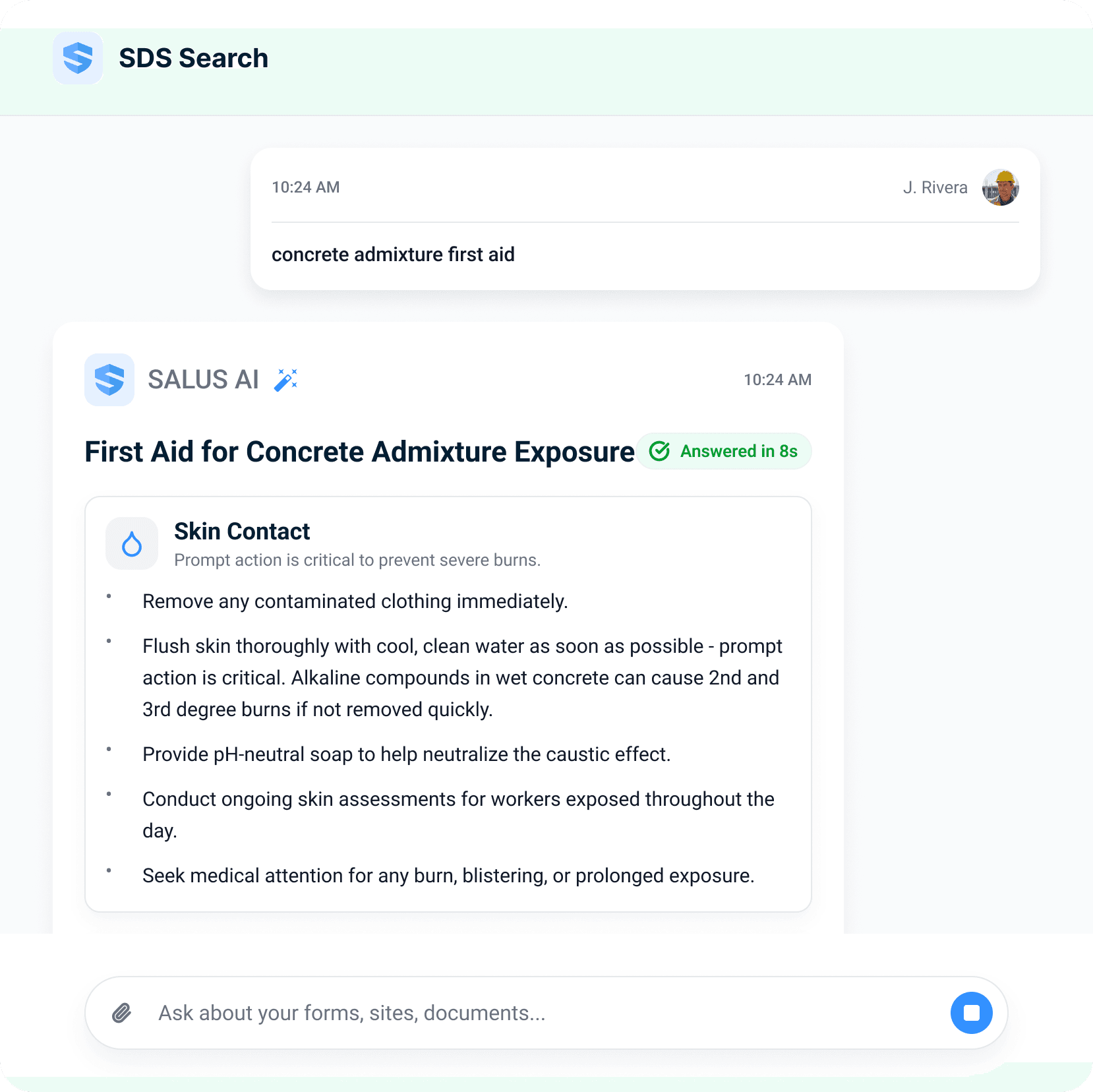
Searchable SDS answering in seconds β€” a worker's typed query 'concrete admixture first aid' answered in 8 seconds with skin-contact first-aid steps: remove contaminated clothing immediately, flush with cool clean water, use pH-neutral soap, and seek medical attention for any burn or prolonged exposure
Natural-language SDS search
Offline chemical library
Verified answers, not PDF hunting
Access event logged
  1. Natural-language & voice SDS search

  2. Answers from the verified SDS on file

  3. Offline cached library

  4. Subcontractor products included

  5. Timestamped access logs

01Act 1 Β· In the field

Ask the question the way the field asks it.

AI Admin & Risk Assistant Β· instant answers

The specific answer to the specific question.

Every chemical product on site has a safety data sheet β€” and in practice it lives in a binder nobody can find. Workers can ask any question to Rosie, the AI Admin & Risk assistant, in plain language, and she returns the specific answer β€” PPE, first aid, handling β€” sourced from the verified SDS on file. Not a link to a 16-page PDF.
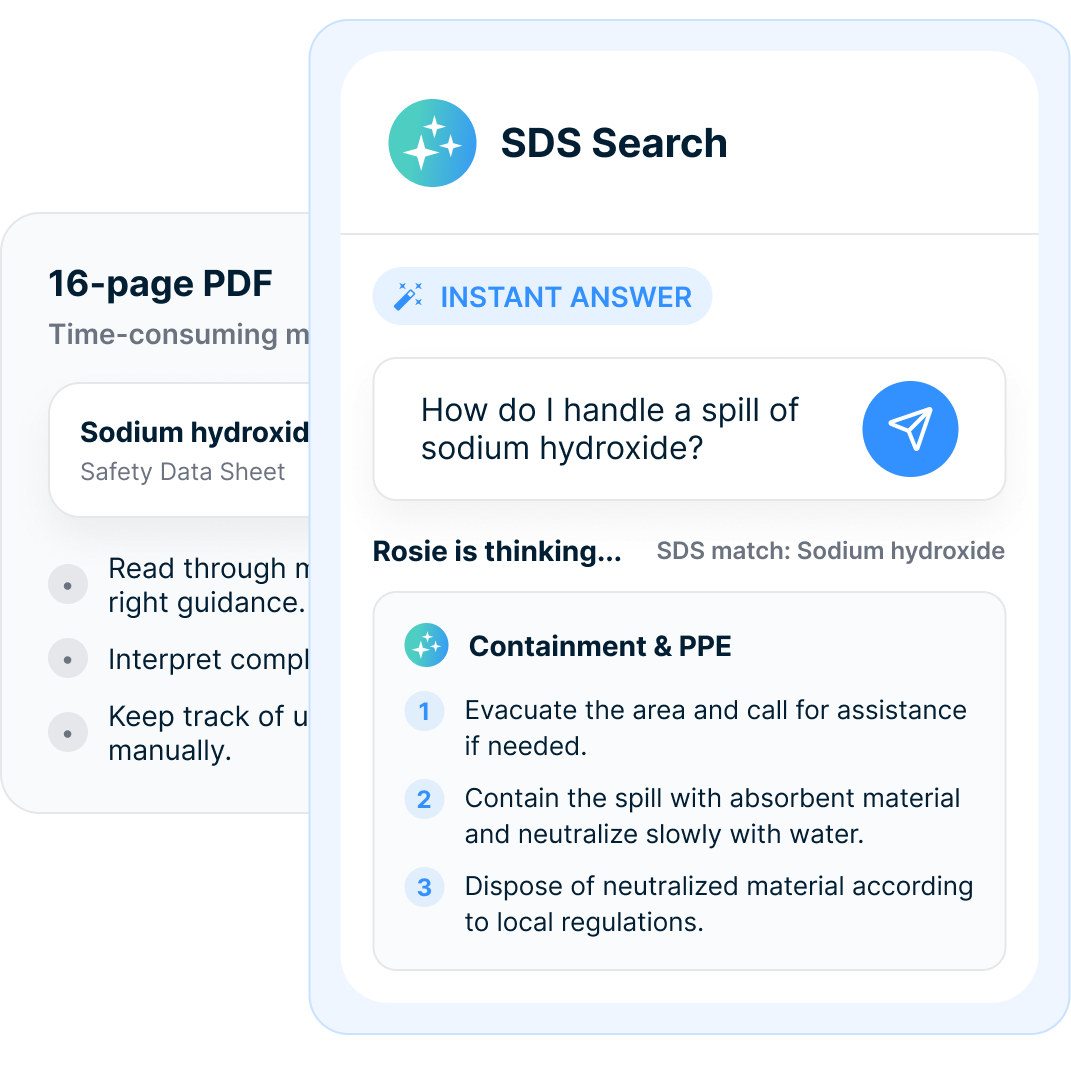
A faded 16-page sodium hydroxide PDF labeled time-consuming β€” read through, interpret, track manually β€” behind a bright SDS Search card where the same question gets an Instant Answer: numbered containment and PPE steps while Rosie matches the sodium hydroxide SDS
β—‰

Ask

Type or speak the question in your own words β€” no product codes.

✦

Match

Rosie matches it to the verified SDS on file for that exact product.

βœ“

Answer

The specific steps β€” PPE, first aid, handling β€” in seconds, source on file.

Not a link. Not a PDF. The answer.

Before the exposure

The PPE question belongs before the lid comes off.

With a searchable library, workers can ask: what do I wear, how do I store it, what if it spills. The answer comes back as numbered PPE and containment steps β€” and one tap sends it into the next toolbox talk, so the crew is briefed before anyone touches the product.

Asked after, it's an incident report. Asked before, it's a toolbox talk.
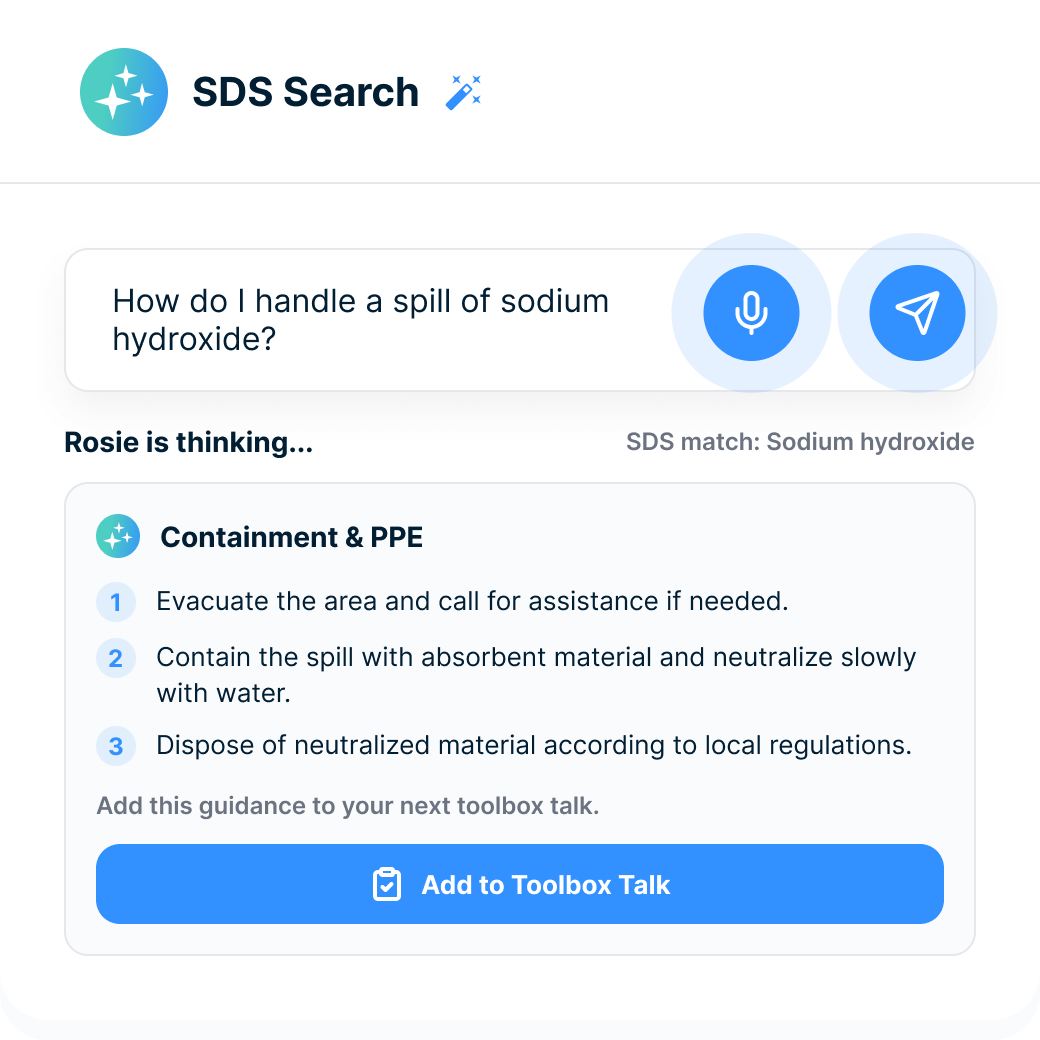
SDS Search with the typed question 'How do I handle a spill of sodium hydroxide?', Rosie matching the sodium hydroxide SDS, a numbered Containment & PPE answer, and an Add to Toolbox Talk button
01 Β·
PPE
What to wear before the product is opened.
02 Β·
Storage
How the product should be stored on site.
03 Β·
Spill response
Containment steps specific to the product.
04 Β·
Toolbox talk
Send the answer into the next crew briefing.
02Act 2 Β· The record

SDS SOFTWARE MUST WORK WHERE CHEMICALS ARE USED.

The library

Every product on site, listed and verified.

Behind every Rosie answer is a complete library: each chemical listed with its verified SDS β€” CAS number, revision. Subcontractor products live in the same library, held to the same standard, accessible by all the workers, sites, and subs who need them. Every sheet is versioned, and every access event is timestamped.

If it's on site, it's on file.
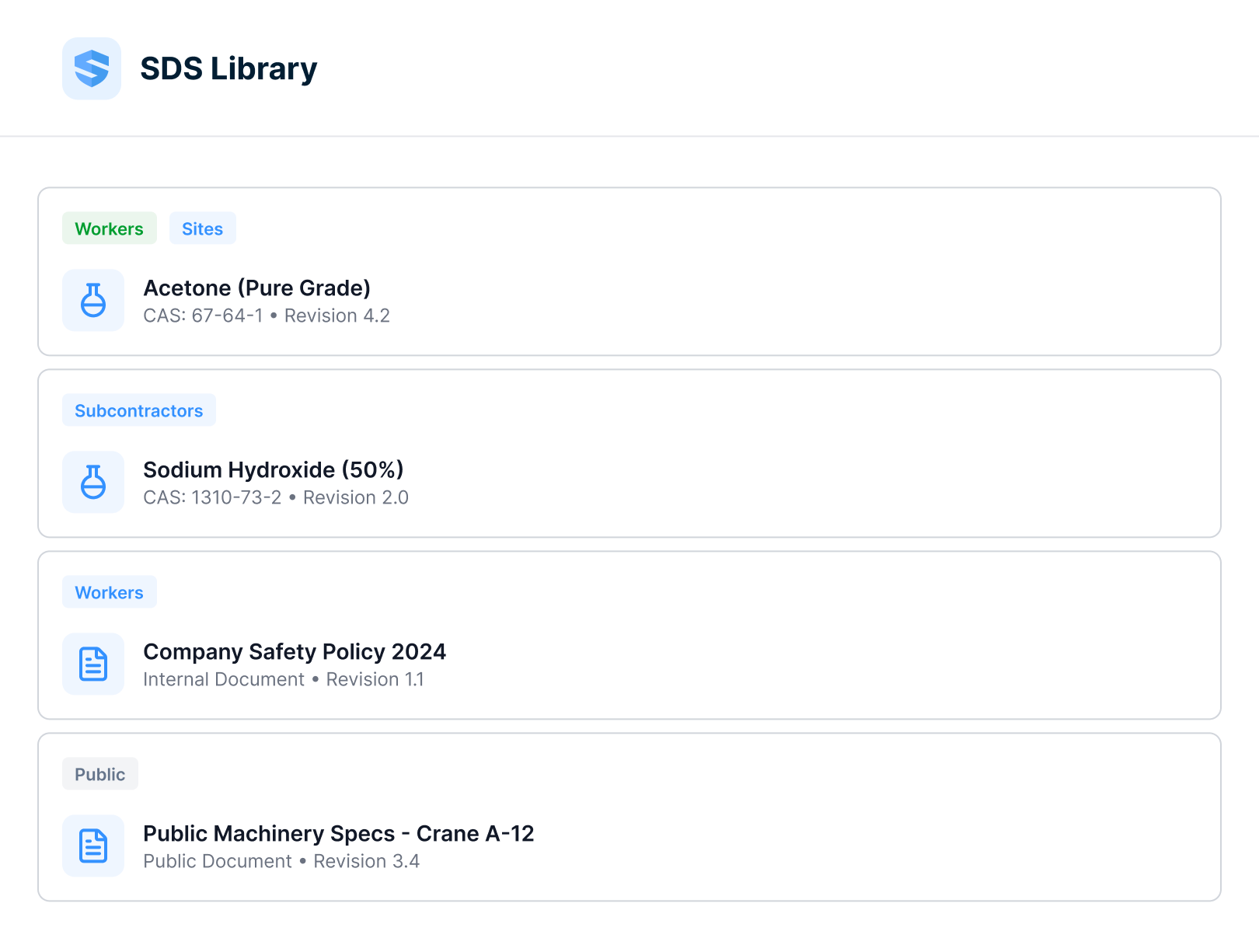
SDS Library list β€” acetone tagged for workers and sites with CAS number and revision 4.2, sodium hydroxide tagged for subcontractors, a company safety policy as an internal document, and public machinery specs for a crane as a public document
01 Β·
Verified & versioned
CAS numbers and revisions on every sheet β€” the current version is the only version.
02 Β·
Subcontractor products
Your subs' chemicals sit in the same library, held to the same standard.
03 Β·
Scoped access
Workers, sites, and subs each see the sheets that concern them.
04 Β·
Timestamped access
Every open and every search is logged β€” who, what, and when.
Any device Β· offline

SDS access has to work where chemicals are used.

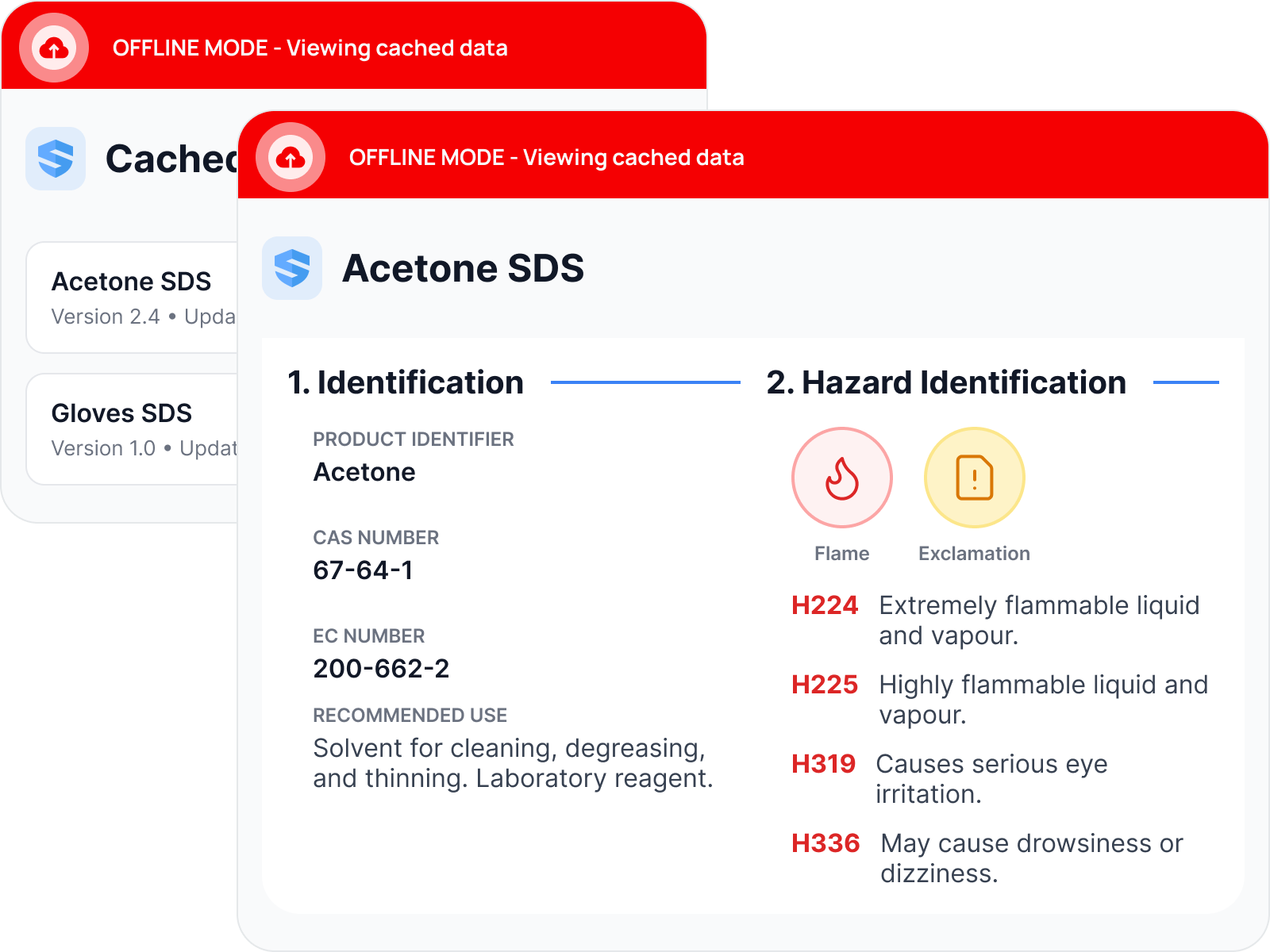
Chemicals get used in basements, parking levels, mechanical rooms, and remote sites β€” exactly where signal dies. SALUS caches the full library on every phone and tablet, hazard sections and all, with a last-synced stamp so nobody wonders how fresh the copy is. The worker three levels down is as protected as the one standing next to the router.

The signal can drop. The answer can't.
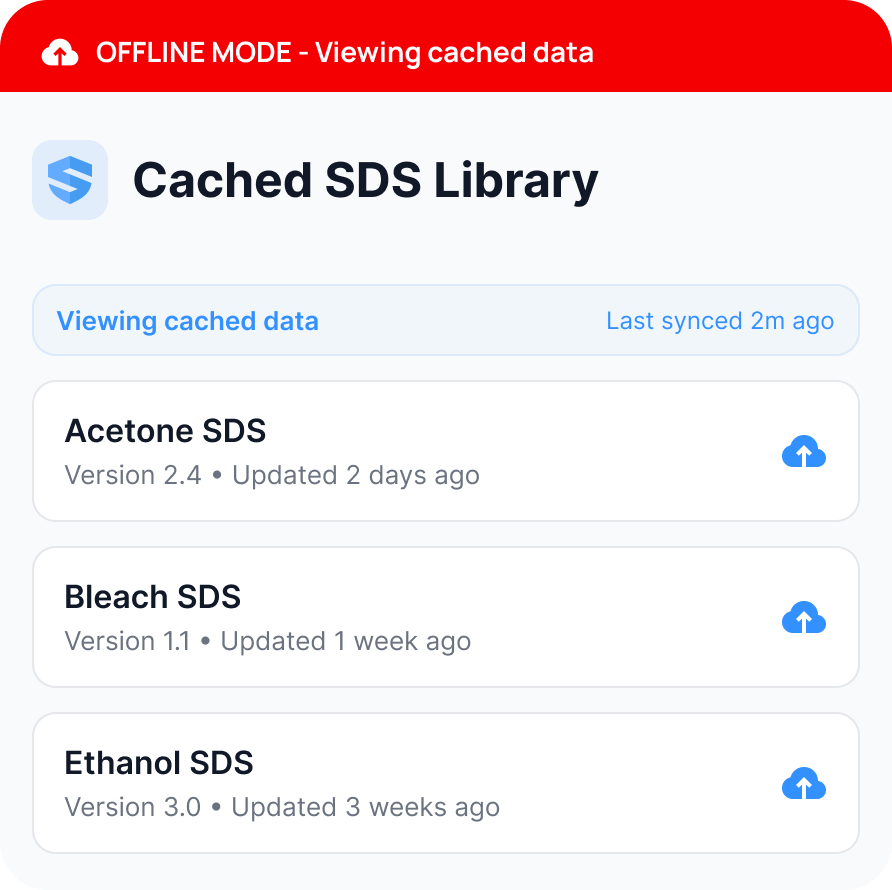
Phone in offline mode showing a cached SDS library β€” acetone, bleach, and ethanol sheets with version numbers and a 'last synced 2 minutes ago' stamp under a red Offline Mode bannerTwo offline screens β€” the cached SDS list behind a full acetone SDS open to its identification and hazard sections, with CAS number, flame and exclamation pictograms, and hazard statements
03Act 3 Β· In the office

Prove coverage and usage β€” hazard communication on the record.

Coverage & access logs

Access logs show who reached the chemical record.

The status view lists each product with its verified sheet, the site it belongs to, and who opened it β€” timestamped. So you can show not just that the sheets were on file, but that crews actually used them.

Stored proves you filed it. Accessed proves it worked.
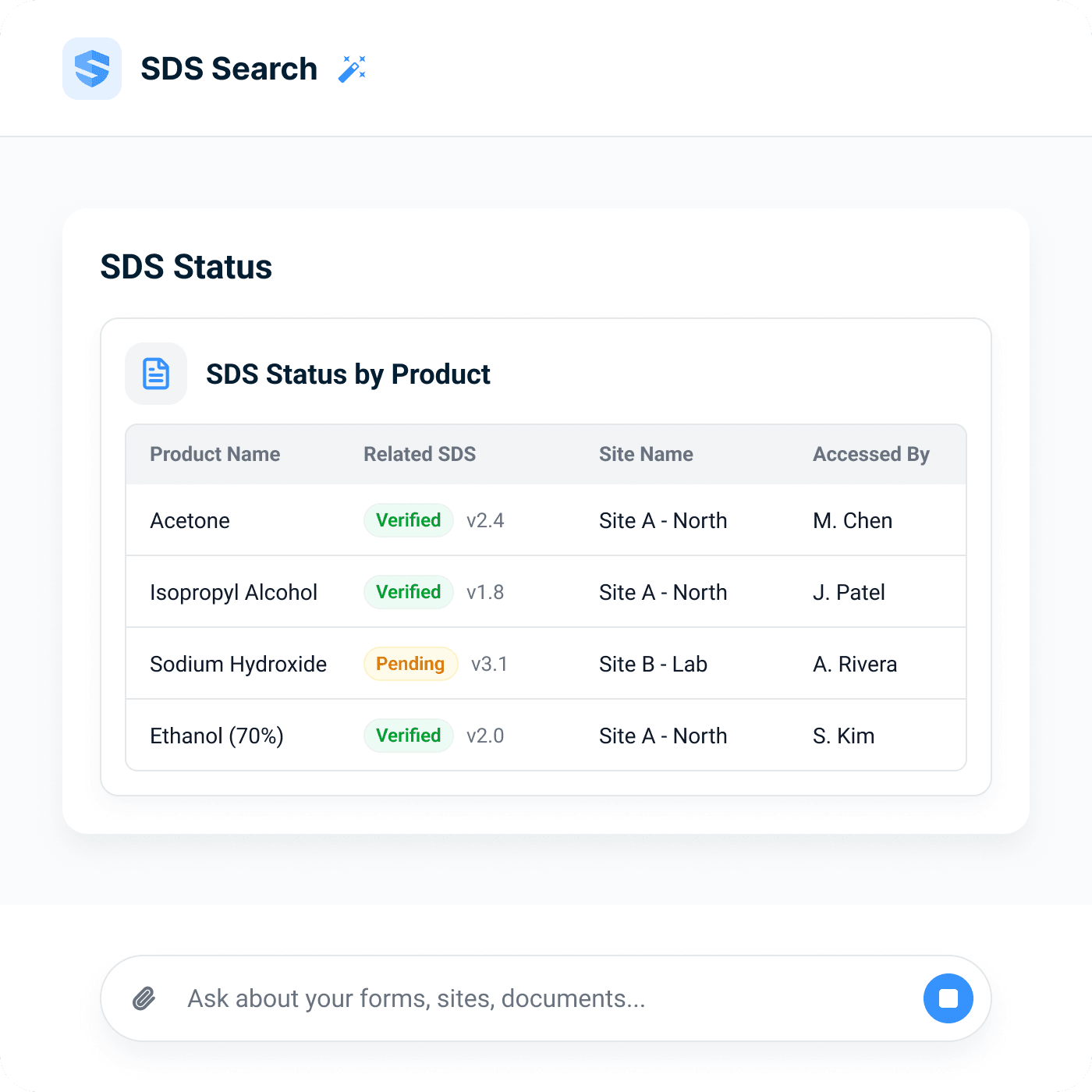
SDS Status by Product table β€” acetone, isopropyl alcohol, and ethanol marked Verified with version numbers, sodium hydroxide marked Pending, each with its site and the name of who accessed it
Coverage by site
Every product, its verified sheet, and its site on one screen.
Timestamped access log
Who opened which sheet, and when β€” usage you can show.
Pending surfaced
Sheets awaiting verification are flagged, not buried.
Gap detection

The system catches what the site forgot.

New products arrive every week; binder updates don’t. A chemical added without its sheet is flagged the moment it appears, and expiry warnings fire before a sheet goes stale β€” so the safety director closes the gap from the office instead of discovering it after an exposure.

A product without its sheet is an alert, not a surprise.
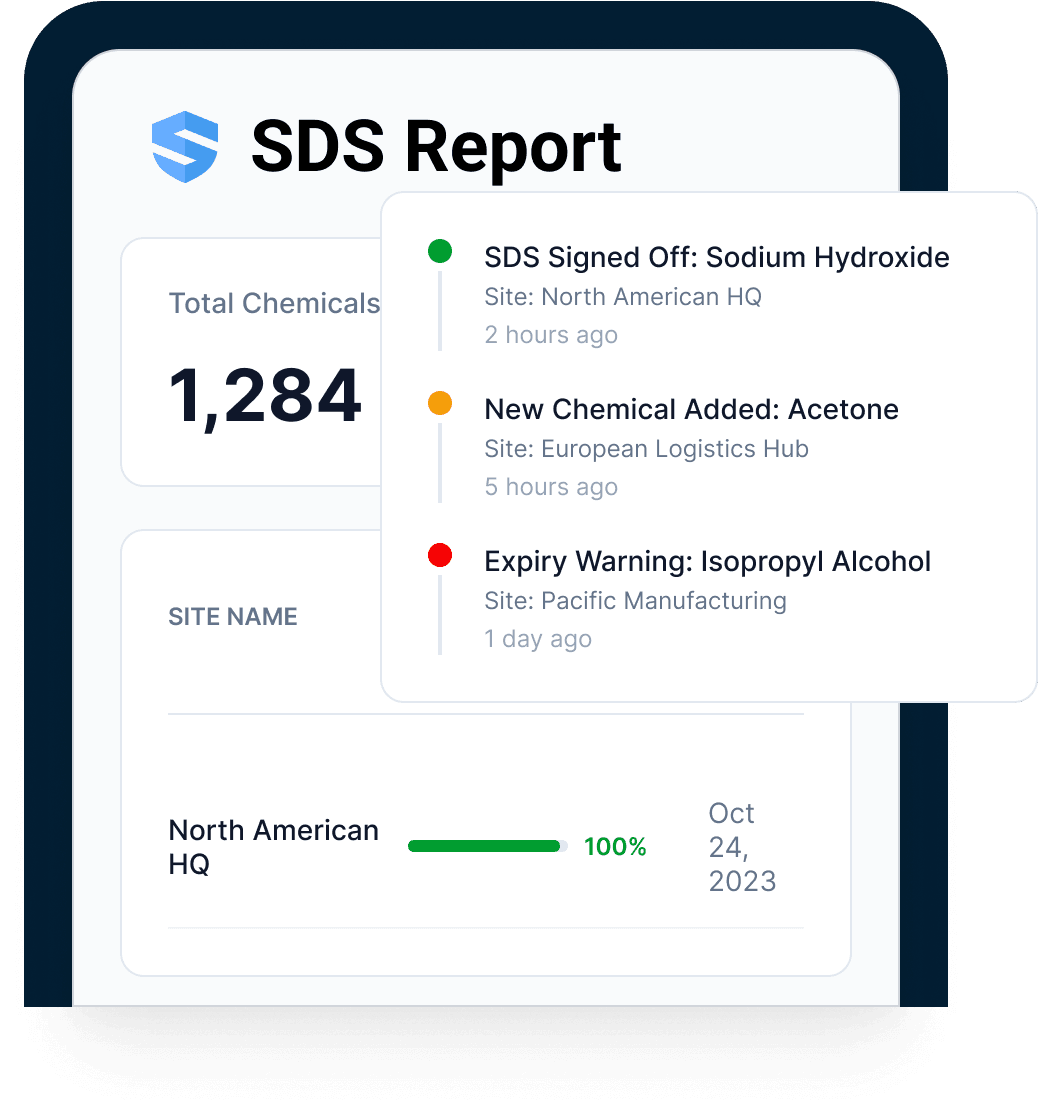
SDS Report with a live event feed β€” a sodium hydroxide SDS signed off two hours ago, a new chemical added five hours ago, an isopropyl alcohol expiry warning β€” above a site row at 100% coverage
Business impact

Faster answers. Stronger chemical readiness.

Chemical exposures are decided in the first minutes β€” and examined for years. SDS management software earns its keep at both ends: in the field, where the speed of the first answer shapes the severity of the outcome; in the office, where verified sheets and timestamped access events replace the filing cabinet. The value is a workforce that asks before handling β€” and a record that proves it.

Answer speed

Workers ask in plain language.

Offline readiness

The library works where chemicals are used.

Proof

Access logs and coverage reports show readiness.

Feature grid

Everything SDS management software should have been doing all along.

01 Β·

Natural-language SDS search

Plain words, not product codes β€” ask it the way you'd say it.

02 Β·

Voice queries

Speak it, in any language. The waveform does the typing.

03 Β·

Verified answers

Specific steps sourced from the verified SDS on file β€” match shown, source attached.

04 Β·

Offline chemical library

Full sheets cached on every device, with a last-synced stamp. No signal required.

05 Β·

PPE & first-aid lookup

The protective answer before handling; the first-aid answer in seconds.

06 Β·

Timestamped access logs

Every search and every open recorded β€” who, what, when.

Go deeper

Go deeper from chemical answer to workflow.

SDS management is strongest when the answer can trigger training, forms, or proof.

FAQ

SDS software for construction, SDS management software, searchable SDS, digital SDS binder, safety data sheet, chemical, and hazard communication FAQ

What is SDS management software for construction?
SDS management software stores safety data sheets for construction chemicals in a searchable digital SDS binder, keeps sheets organized by product and site, and helps workers find verified PPE, first-aid, handling, and exposure answers from the field.
What is a safety data sheet?
A safety data sheet, or SDS, is the standardized document manufacturers provide for hazardous products. It covers hazards, safe handling, storage, PPE, first-aid measures, spill response, and other chemical safety information.
Can SDSs be stored electronically instead of in a paper binder?
Electronic SDS access can support hazard communication when employees can readily access the sheets during their work shift and there is a reliable backup for outages. SALUS supports a digital SDS binder with offline access.
What are OSHA HazCom SDS access requirements?
OSHA Hazard Communication Standard 29 CFR 1910.1200 requires employers to keep safety data sheets for hazardous chemicals and make them readily accessible to employees in their work area. SALUS helps organize access and proof; your safety team remains responsible for the program.
What are the 16 sections of an SDS?
The 16-section SDS format includes identification, hazards, composition, first aid, fire-fighting, accidental release, handling and storage, exposure controls/PPE, properties, stability, toxicology, ecological, disposal, transport, regulatory, and other information.
Can workers ask SDS questions in plain language or by voice?
Yes. Workers can ask by chemical, task, symptom, spill, PPE, first aid, or handling question. Rosie matches the question to the verified SDS on file and returns the specific answer.
Where do Rosie SDS answers come from?
Rosie answers from the verified SDS on file for the product, not from a generic internet search. The source sheet stays attached so the full document is available when needed.
Does SDS search work offline?
Yes. The chemical library can be cached on phones and tablets so workers can search SDS information in basements, mechanical rooms, remote sites, and other low-signal work areas.
Can subcontractor chemicals be included in the SDS library?
Yes. Subcontractor products can live in the same SDS library as GC-managed products, with verified sheets, versioning, scoped access, and coverage visibility.
Can SDS answers feed toolbox talks, JHAs, or digital forms?
Yes. SDS guidance can support toolbox talks, pre-task planning, JHAs, digital forms, QR-code workflows, training, and incident follow-up when the chemical answer needs to become part of the safety record.
What do SDS access logs prove?
Access logs show which product record or sheet was opened, by whom, and when. That helps safety teams show not only that SDSs were on file, but that crews could reach and use them.
What should we bring to a searchable SDS demo?
Bring one chemical question, safety data sheet, paper binder workflow, subcontractor product list, spill response scenario, or PPE lookup. SALUS can map the answer path from field question to verified source and access proof.
Verified compliance resource

Need the rule behind the workflow?

Use the dated OSHA for Construction field guide for current penalties, inspection steps, recordkeeping, and heat-rule status.

Explore the OSHA field guide
SDS demo

Bring one SDS question.
We will show the answer path.

Ask about PPE, first aid, handling, exposure, access logs, offline library, and the source safety data sheet.

Bring the current workflow. We will map the live version from field action to proof.